
Google Search Console’s Generative AI Report Explained
Google has introduced dedicated Generative AI performance reports in Search Console, giving website owners a clearer view of how their content appears in AI Overviews, AI Mode and generative AI experiences in Google Discover.
The new reporting is an important step forward, but it does not provide complete AI-search attribution.
It can show:
How many generative AI impressions your website receives.
Which pages appear most often.
Where those impressions originate.
Which devices people use.
How visibility changes over time.
It does not currently tell you the exact search queries or prompts that triggered your content, and the dedicated report should not be treated as a complete measurement of clicks, leads or revenue.
The real value comes from combining the report with Google Analytics, conversion tracking, CRM data and broader competitor intelligence. Businesses also need a connected SEO and AI-search visibility strategy to turn these insights into stronger content, technical improvements and measurable commercial outcomes.
Answer Summary
Google announced its new Search Generative AI performance reports on June 3, 2026. Separate reports are being introduced for Google Search and Google Discover, although access is initially limited to a subset of website owners.
The Search report currently includes impressions from:
Google AI Overviews.
Google AI Mode.
The dedicated report allows website owners to analyze these impressions by page, country, device and date. Search Labs experiments are not included.
However, the report does not currently provide a query dimension or a dedicated breakdown of clicks, click-through rate and average position. This means it should be viewed as an AI visibility report, not a complete AI-search conversion report.
Why Google Introduced a Generative AI Report
Until now, website visibility in AI Overviews and AI Mode was included within the standard Web performance data in Search Console.
That made it difficult to distinguish between:
Traditional organic search visibility.
Visibility within AI-generated answers.
Changes caused by new AI-search behaviour.
Changes caused by conventional rankings.
Google’s new report creates a separate view of generative AI impressions while continuing to include the data in the overall Search performance report.
This provides marketers and website owners with a better starting point for answering questions such as:
Is our content appearing in Google’s AI-generated experiences?
Which pages are being surfaced?
Is our generative AI visibility increasing?
Are we visible in the countries that matter to the business?
Is Google using our commercial pages, educational content or both?
Did recent content or technical improvements affect visibility?
These are valuable questions, but they are only the beginning of the analysis.
What Is Included in the Generative AI Performance Report?
Google has introduced two related reports.
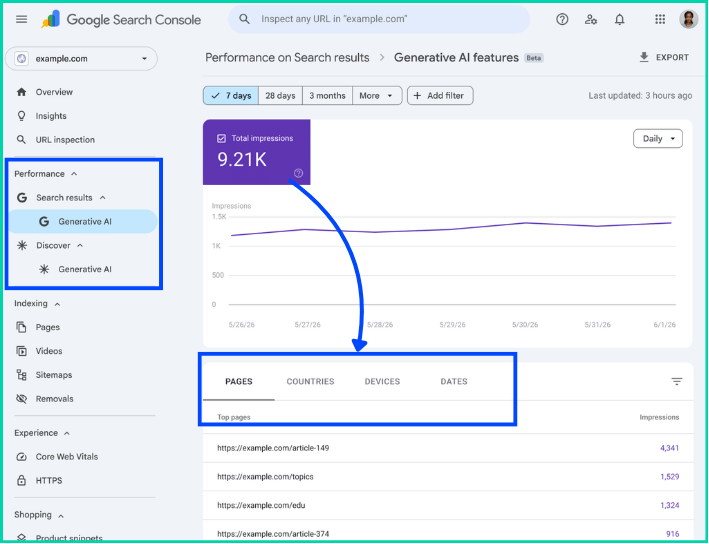
1. Generative AI Performance Report for Search
This report includes impressions from AI Overviews and AI Mode.
It can be analyzed through the following dimensions:
| Dimension | What it helps you understand |
|---|---|
| Pages | Which URLs from your website appeared in generative AI features |
| Countries | Where the searches originated |
| Devices | Whether visibility came from mobile, desktop or tablet searches |
| Dates | How impressions changed by day, week or month |
Google assigns most page-level data to the canonical URL, just as it does in the standard Performance report.
2. Generative AI Performance Report for Discover
Google has also introduced a separate report for generative AI features in Discover.
The Discover report can show:
Total generative AI impressions.
Pages receiving those impressions.
Countries where the content was viewed.
Changes over time.
Device reporting is documented for the Search report, but not as a dimension in the Discover version.
What Is Not Included?
The report does not include activity from experimental features running within Search Labs.
It also does not measure visibility in other AI platforms such as:
ChatGPT.
Perplexity.
Claude.
Microsoft Copilot.
Non-Google AI assistants.
It is specifically a report about generative AI features within Google Search and Google Discover.
| The report shows | The report does not show |
|---|---|
| Generative AI impressions | Exact prompts or queries |
| Visible pages | AI-specific conversions |
| Countries | Revenue attribution |
| Devices | Separate AI Overview and AI Mode data |
| Visibility over time | Visibility on ChatGPT or Perplexity |
What Counts as a Generative AI Impression?
An impression means that a link to your website was shown—or was potentially seen—within an eligible Google experience.
The exact counting method depends on where the link appears.
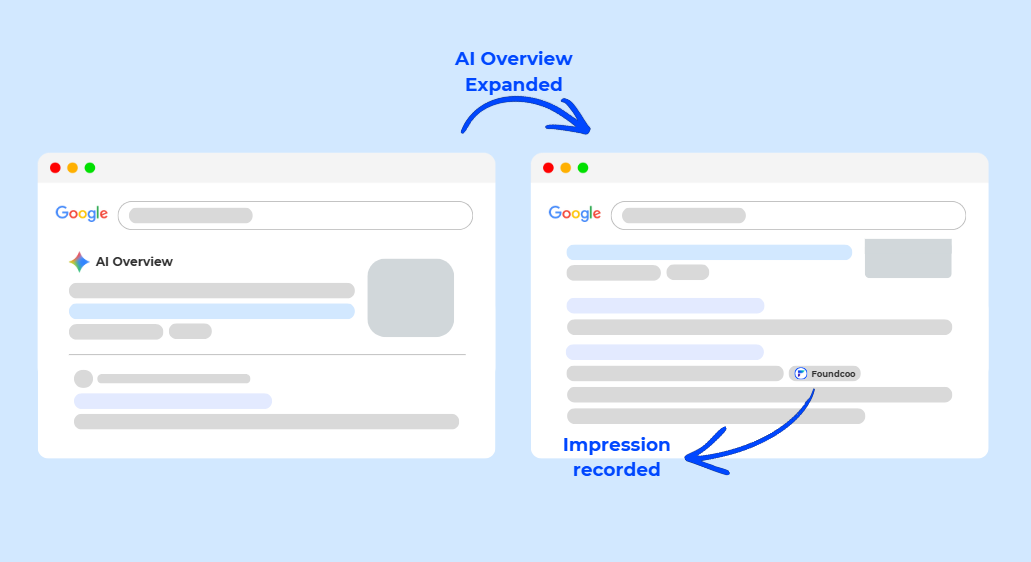
AI Overview impressions
For a link inside an AI Overview to receive an impression, it generally needs to be scrolled or expanded into view.
An AI Overview occupies one Search position, and all links within that overview are assigned the same position in the overall Search Console data.
AI Mode impressions
Standard impression-counting rules apply in AI Mode.
When a user asks a follow-up question within AI Mode, Google treats that interaction as a new query. The impressions, clicks and position data generated by the new response are attributed to that new query in the overall Search performance data.
Property-level versus page-level aggregation
The report’s chart is aggregated at property level.
For example, when two links from the same website appear within one generative AI search feature, they may count as one property-level impression in the chart.
When the data is grouped by page, each qualifying URL can appear separately in the table. This is one reason the chart total and page-table totals may not always match.
This distinction matters when reporting results.
A page-level increase does not always translate directly into an identical increase in the property-level total.
What the Report Does Not Tell You
The new report provides information that website owners have been requesting, but it still leaves several major questions unanswered.
1. It does not show the exact queries or prompts
The dedicated Generative AI report currently documents page, country, device and date dimensions. It does not provide a query dimension.
You may see that a service page received 2,000 generative AI impressions without knowing whether the user asked:
“What is the best B2B marketing agency in Hong Kong?”
“How can an industrial company improve SEO?”
“Which agencies provide AI-search optimization?”
“How much does digital marketing cost in Singapore?”
“How do I improve e-commerce visibility in Asia?”
This makes it difficult to understand the exact context in which the page appeared. It is also important to remember that AI-search results can vary between users, platforms and repeated searches, making visibility more difficult to evaluate through a single test or prompt.
Marketers will still need to combine:
Page intent.
Existing Search Console query data.
Keyword research.
Customer questions.
AI prompt testing.
Competitor analysis.
These signals can help infer the topics that may be generating visibility, but they cannot confirm the exact AI prompt.
2. The dedicated report focuses on impressions
The report is designed primarily around generative AI impressions.
Google’s standard Search performance reporting still records clicks from external links in AI Overviews and AI Mode. However, the dedicated Generative AI report does not currently offer the same full set of click, CTR, query and position breakdowns that marketers are accustomed to using in the conventional Performance report.
This means you cannot use the report alone to answer:
How many AI impressions generated a website visit?
Which AI feature generated the click?
Which AI-generated query converted?
What was the click-through rate for AI Overviews?
How much revenue came from generative search?
3. It does not clearly separate AI Overviews from AI Mode
Google states that the Search report includes both AI Overviews and AI Mode, but its current documentation does not list a dimension that allows users to separate the two feature types.
At this stage, the report should therefore be interpreted as a combined view of supported generative AI visibility unless Google adds further segmentation.
4. An impression is not an endorsement
Appearing within a generative AI feature does not automatically mean that:
Google considers your company the market leader.
Your brand was explicitly recommended.
Your content was quoted directly.
The user noticed your link.
The user visited your website.
The appearance influenced a purchase.
An impression confirms visibility—not persuasion, engagement or commercial impact.
Why Can’t I See the Generative AI Report?
Google is rolling the report out to a subset of website owners before making it more widely available.
You may not see it for three main reasons.
The report has not reached your property
Not all Search Console properties currently have access.
Google is testing the feature and gathering feedback before expanding the rollout.
Your website has insufficient generative AI impressions
Google may not display the report when the property has not received enough eligible impressions.
This does not necessarily prove that the website has never appeared. It may simply mean the available data has not reached Google’s reporting threshold.
Your site has been excluded from Search generative AI features
Google has also introduced a Search generative AI control in Search Console.
The default setting allows a website’s links and content to appear within:
AI Overviews.
AI Mode.
Generative AI features in Discover.
Website owners with access to the control can manage it under Search Console settings. Excluding a site prevents its content and links from appearing in the covered generative AI features, although the setting does not remove the website from traditional Google Search.
Before investigating a lack of data, confirm that your property is included in generative AI features.
How to Analyze the Report Properly
The biggest mistake would be to open the report, look at the total number of impressions and conclude that AI visibility is improving or declining.
Use the following process instead.
Step 1: Establish a baseline
Record your starting data over a consistent period, such as the previous 28 or 90 days.
Document:
Total generative AI impressions.
Number of pages receiving impressions.
Five pages with the most visibility.
Main countries.
Device distribution.
Significant spikes or declines.
The initial objective is not to judge performance.
It is to establish the point from which future changes can be measured.
Step 2: Classify the visible pages
Do not evaluate all pages as though they serve the same purpose.
Group them by page type:
Homepage.
Service pages.
Product pages.
Industry or application pages.
Articles and guides.
Case studies.
Comparison pages.
About or company pages.
Contact and conversion pages.
This can reveal how Google understands the website.
For example:
High visibility for educational articles but no service-page visibility may indicate that Google understands your expertise but not your commercial relevance.
Product-page visibility without supporting guides may suggest that the website is discoverable for known solutions but not early-stage questions.
Case-study visibility can signal that practical evidence is contributing to discovery.
Visibility concentrated on the homepage may mean that more specific pages need stronger content and internal linking.
Step 3: Examine geographical relevance
A large number of impressions is not automatically positive when they come from markets the business cannot serve.
Compare the country data with:
Target markets.
Sales territories.
E-commerce delivery regions.
Distributor coverage.
Language versions.
Current expansion priorities.
A Hong Kong or Singapore business targeting regional B2B buyers should evaluate whether its AI visibility is appearing in commercially relevant Asian and international markets—not simply whether the global number increased.
Step 4: Review device behaviour
Device data can reveal how audiences encounter the company.
A mobile-heavy pattern may suggest that users are performing quick research, while desktop visibility may be more prominent for complex B2B or professional research.
The report alone cannot confirm user intent, but the device split can inform:
Page design.
Content structure.
Form length.
CTA placement.
Mobile page speed.
Readability.
Contact options.
Step 5: Compare AI visibility with wider Search performance
The Generative AI report should not replace the standard Search performance report.
Compare it with:
Total organic impressions.
Organic clicks.
Branded queries.
Non-branded queries.
Average position.
High-performing pages.
New and declining search topics.
Because generative AI data remains included within the overall Web search type, changes in AI visibility may also influence the broader Search Console numbers.
The dedicated report provides context, while the standard report provides the broader Search picture.
Step 6: Connect visibility with website behaviour
Search Console tells you that your content appeared.
Google Analytics can tell you more about what people did after arriving.
Review:
Organic landing-page sessions.
Engaged sessions.
Returning visitors.
Service-page journeys.
Case-study engagement.
Downloads.
Form starts.
Form submissions.
Calls or booked meetings.
It may not always be possible to identify a visit as originating specifically from an AI Overview or AI Mode. That is why page-level and time-based comparison becomes important.
For example, when a page experiences:
Rising generative AI impressions.
Increasing branded searches.
More direct traffic.
More returning visitors.
More assisted conversions.
The combined signals may indicate that AI visibility is contributing to wider discovery, even when there is no clean last-click attribution path.
Step 7: Connect marketing data with the CRM
The final measurement should not stop at traffic or form submissions.
Track whether enquiries become:
Qualified leads.
Sales conversations.
Meetings.
Proposals.
Opportunities.
Pipeline value.
Customers.
Revenue.
This is particularly important in B2B markets, where buyers may conduct several searches, consult AI tools, visit LinkedIn and return directly before contacting a supplier.
The source recorded during the final website visit rarely explains the full journey. This is why AI-search visibility has become a marketing intelligence problem, requiring businesses to connect search exposure with website behaviour, competitor activity, conversions and commercial outcomes.
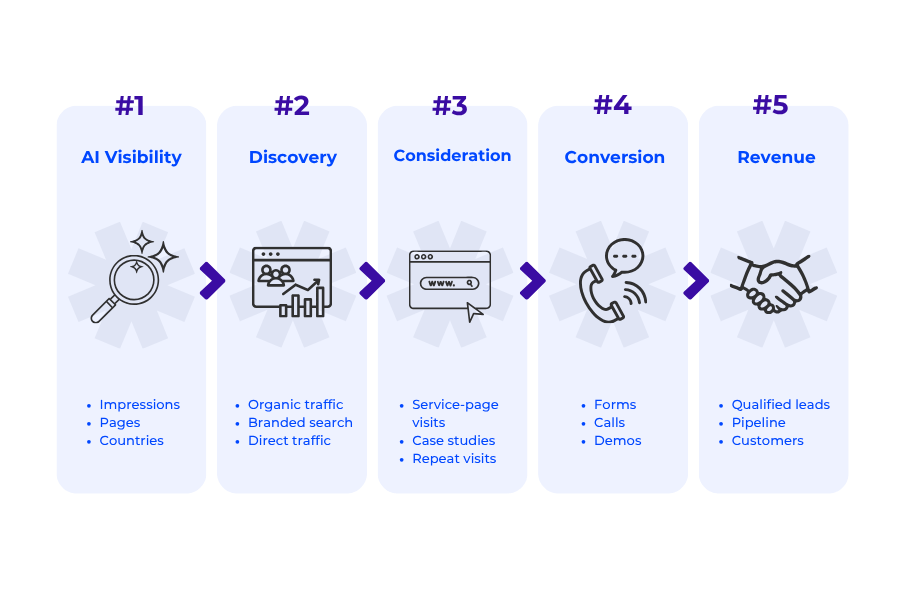
The Foundcoo Visibility-to-Revenue Framework
Businesses can use the following model to turn the new report into a practical measurement system.
Stage 1: AI Visibility
Measure:
Generative AI impressions.
Pages appearing.
Visibility growth.
Target-market visibility.
Device distribution.
Main question: Is Google surfacing our website in generative AI experiences?
Stage 2: Discovery
Measure:
Organic traffic.
Branded-search growth.
Direct traffic.
New users.
Returning visitors.
LinkedIn company and employee-profile visits.
Main question: Are more people actively looking for the company after encountering it?
Stage 3: Consideration
Measure:
Service-page visits.
Product-page visits.
Case-study engagement.
Comparison-page visits.
Downloads.
Repeat sessions.
Multiple-page journeys.
Main question: Are visitors evaluating the company’s expertise and solutions?
Stage 4: Conversion
Measure:
Contact forms.
Demo requests.
Calls.
Meeting bookings.
Trial registrations.
Newsletter subscriptions.
Main question: Is increased visibility producing identifiable actions?
Stage 5: Revenue
Measure:
Qualified leads.
Sales-accepted leads.
Opportunities.
Pipeline value.
Win rate.
Revenue.
Customer acquisition cost.
Main question: Is AI and search visibility contributing to commercial growth?
This framework prevents teams from making one of two common mistakes:
Ignoring AI visibility because it cannot always be attributed through a direct click.
Celebrating AI impressions without investigating whether they contribute to meaningful business outcomes.
A Monthly Generative AI Reporting Template
A practical monthly report could use the following structure:
| Reporting area | What to record | What to investigate |
|---|---|---|
| Total visibility | Generative AI impressions | Did visibility rise or fall? |
| Page coverage | Number of visible URLs | Is visibility becoming more distributed? |
| Top pages | Five or ten leading pages | Why are these pages being surfaced? |
| Page types | Articles, services, cases and products | Is commercial content also visible? |
| Countries | Leading markets | Are impressions coming from target regions? |
| Devices | Mobile, desktop or tablet | Does the website experience match the audience? |
| Search performance | Impressions, clicks and branded demand | Is wider discovery changing? |
| Website engagement | Sessions, engagement and journeys | Are visitors exploring relevant content? |
| Conversions | Forms, calls, demos and trials | Are business actions increasing? |
| Revenue | Leads, opportunities and customers | What commercial contribution can be identified? |
| Priorities | Three actions for the next period | What should be improved first? |
Add a short written interpretation.
Do not send stakeholders a graph without explaining:
What changed.
Why it may have changed.
Whether the change matters.
What action should follow.
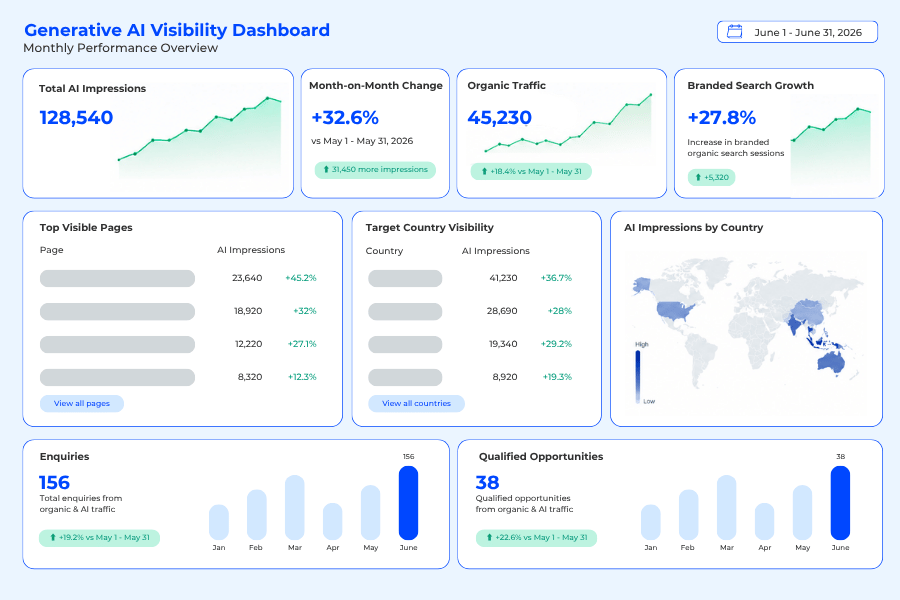
How to Improve Your Visibility in Google’s Generative AI Features
Google’s guidance is clear: businesses do not need a completely separate technical system or secret optimization method for AI Overviews and AI Mode.
The same SEO foundations remain important because Google’s generative AI experiences use information from its Search index and core ranking systems. Our guide to adapting SEO for Google’s AI Overviews and AI Mode explains how to structure content around direct answers, deeper buyer questions and AI-supported discovery.
Focus on the following areas.
Create genuinely useful, expert-led content
Google recommends content that provides something beyond information already repeated across the web.
That may include:
Original research.
First-hand experience.
Technical expertise.
Proprietary data.
Practical case studies.
Expert commentary.
Detailed comparisons.
Real examples.
Industry-specific recommendations.
Google explicitly advises against simply recycling information that could easily be produced by any generative AI model.
Build clear content around buyer questions
Your pages should answer the questions customers ask while they:
Identify a problem.
Explore possible solutions.
Compare approaches.
Evaluate suppliers.
Calculate costs.
Assess implementation risks.
Prepare to make contact.
This does not mean creating hundreds of thin pages for every slight keyword variation.
It means creating comprehensive, well-organised resources that answer the main question and the logical questions that follow.
Maintain a strong technical foundation
To be eligible as a supporting link in AI Overviews or AI Mode, a page must be indexed and eligible to appear in Google Search with a snippet. Google does not require an additional AI-specific technical standard.
Important foundations include:
Crawlable pages.
Logical website architecture.
Strong internal linking.
Correct canonicalisation.
Mobile usability.
Fast page performance.
Important content available in text.
Helpful images and videos.
Structured data that matches visible page content.
Do not rely on unsupported AI-search shortcuts
Google’s current guidance states that websites do not need:
A special AI schema.
An llms.txt file for Google Search.
Artificially fragmented or “chunked” content.
Rewritten pages created only for AI systems.
Inauthentic mentions designed to manipulate visibility.
Google says these tactics do not provide special benefits for its generative Search features.
The more sustainable strategy is to make the business:
Technically accessible.
Easy to understand.
Useful to customers.
Demonstrably experienced.
Consistent across multiple credible sources.
Where Claryx Fits into the Analysis
Claryx is Foundcoo's AI marketing intelligence platform — built to power our own client campaigns, now available to yours.
Search Console provides valuable first-party Google data, but it remains one part of the wider marketing picture.
Claryx, developed by Foundcoo, connects Google Search Console with wider website, SEO, social and competitor intelligence. It can help businesses compare their performance with competitors, identify technical and content gaps and prioritize the actions that are most likely to improve visibility.
The objective is not to replace Search Console.
It is to provide more context around questions such as:
Are our competitors publishing stronger content?
Do they have better technical performance?
Are they building authority faster?
Which content gaps should we address?
Is our website improving relative to the market?
What should the team prioritize next?
This becomes increasingly important as search visibility is distributed across conventional rankings, AI-generated answers, social platforms, competitor content and third-party sources.
Common Questions About Google Search Console’s Generative AI Report
-
It is a dedicated Search Console report showing how often a website appears in supported generative AI features. The Search version currently includes AI Overviews and AI Mode, while Google also provides a separate report for generative AI features in Discover.
-
The dedicated report is centred on impressions. Clicks from external links in AI Overviews and AI Mode can still be recorded in the broader Search Console Performance report, but the dedicated Generative AI report does not currently provide a complete AI-specific click and CTR breakdown.
-
No query or prompt dimension is currently documented for the dedicated report. Website owners can analyse visible pages, countries, devices and dates, but not the exact questions that caused the content to appear.
-
The report may not yet have been rolled out to your property, your website may not have enough generative AI impressions or your site may have been excluded from eligible generative AI features.
-
No. It covers supported generative AI features within Google Search and Google Discover. It does not report visibility from independent platforms such as ChatGPT, Perplexity or Claude.
-
Website owners with access to Google’s new Search generative AI control can choose whether eligible links and content may appear within AI Overviews, AI Mode and generative AI features in Discover. Excluding a site from these features does not automatically remove it from conventional Google Search.
-
No special schema is required specifically for Google’s generative AI features. Standard structured data can still support broader Search visibility and rich results, but it should accurately reflect the content visible on the page.
-
Yes. Google states that its generative AI features are grounded in its Search index and core ranking and quality systems. Crawlability, indexation, content quality, internal linking, page experience and technical SEO therefore remain important.
The Report Is a Beginning, Not a Complete Measurement System
Google Search Console’s Generative AI report gives businesses something they previously lacked: a dedicated view of visibility within Google’s AI-generated Search experiences.
It can reveal whether visibility is growing, which pages Google surfaces and where those impressions originate.
But impressions alone cannot tell you whether:
The right audience found the business.
The user noticed the company.
The appearance generated a website visit.
The visit influenced an enquiry.
The enquiry became revenue.
The next stage of AI-search measurement therefore requires a connected view of:
Search visibility.
Website behaviour.
Branded demand.
Competitor performance.
Conversion data.
CRM outcomes.
Revenue.
That is how businesses can move from asking:
“Are we appearing in AI search?”
To answering:
“Is our visibility helping the right customers discover, trust and choose us?”
Understand What Your AI-Search Data Really Means
Foundcoo helps B2B, industrial and e-commerce companies improve visibility across traditional search and AI-generated experiences.
We combine technical SEO, content strategy, authority development, analytics, conversion tracking and marketing intelligence to identify:
Where your business is visible.
Which pages are being surfaced.
Where competitors are ahead.
What is limiting discoverability.
Which improvements should be prioritized.
How search visibility connects with enquiries and revenue.
Request an AI Search Visibility Audit and discover what Google and AI platforms understand about your business—and what may be preventing you from being found.